
LeechTunes4.6.4 - App Store
You'll be able to see results in few seconds.
Publisher Description



Love Apple Music? Enhance the experience with LeechTunes! Add all your favourite music via Apple Music then enjoy them with LeechTunes.
LeechTunes is the fresh new way to enjoy your music. Now you can listen to your music with great ease and style. LeechTunes features customized gesture controls in a skinned interface that shouts out your personality.
LeechTunes is perfect for in-car use for safer music control. No need to look away from the road while changing track & playlist. Also great while doing other tasks like jogging, working-out or just general listening.
- Main Features:
• Gesture controls for basic iPod functions.
• Portrait and Landscape layouts.
• 21 built-in skins/themes.
• User skin. Use your favourite image as background!
• View official site of current track's artist.
• Quick web search for related YouTube videos.
• Wikipedia info on artist.
• Programmable 2-finger gesture controls for easy access to frequently used functions.
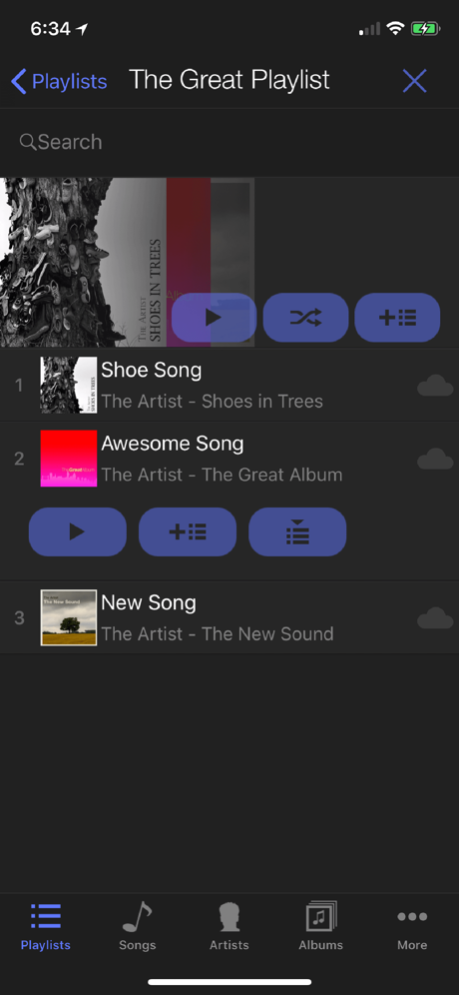
• A more powerful media browser with music queuing and playlist management.
• Auto-lock disable function with paused music override.
• Time display.
• Sleep timer.
• Brightness control.
• Auto dim.
• Song scrubbing.
• Voice notification.
• Rate Song.
• Lyrics with web lyrics search (by lyrics.wikia.com).
• Share on Facebook, Instagram and Twitter. Share with friends what you are currently listening!
• Audio route button to easily change audio output including Airplay and Bluetooth devices.
• Russian, Spanish, German, Japanese, French, Korean, Simplied and Traditional Chinese languages supported.
- All customizable gesture controls:
• Tap: Play/Pause music
• Left/Right Swipe: Previous/Next track
• Up/Down Swipe: Volume control
• Double-Tap: Toggle Shuffle Mode
• Triple-Tap: Toggle Repeat Mode
• 2-Finger Tap: Play All Media
• 2-Finger Up/Down: Switch Playlist
• 2-Finger Left/Right: Forward/Rewind (quick-swipe to skip 30s)
• Shake: Shuffle play songs.
• Tap & Hold: Play current artist.
• 2-FingerTap & Hold: Share on Facebook.
Other available functions:
• Previous Skin.
• Next Skin.
• Play current album.
• Show Playlist.
• Share on Instagram.
• Tweet.
• Mute On/Off.
• Brightness +/-
• Song scrubbing.
• Sleep timer.
• Voice notify current track title.
• Lyrics.
• Rate Song.
Enjoy!
Nov 27, 2021
Version 4.6.4
v4.6.4:
- more bug fixes (iOS 15 UI issues)
About LeechTunes
The company that develops LeechTunes is Leechbite Apps. The latest version released by its developer is 4.6.4.
To install LeechTunes on your iOS device, just click the green Continue To App button above to start the installation process. The app is listed on our website since 2021-11-27 and was downloaded 0 times. We have already checked if the download link is safe, however for your own protection we recommend that you scan the downloaded app with your antivirus. Your antivirus may detect the LeechTunes as malware if the download link is broken.
How to install LeechTunes on your iOS device:
- Click on the Continue To App button on our website. This will redirect you to the App Store.
- Once the LeechTunes is shown in the iTunes listing of your iOS device, you can start its download and installation. Tap on the GET button to the right of the app to start downloading it.
- If you are not logged-in the iOS appstore app, you'll be prompted for your your Apple ID and/or password.
- After LeechTunes is downloaded, you'll see an INSTALL button to the right. Tap on it to start the actual installation of the iOS app.
- Once installation is finished you can tap on the OPEN button to start it. Its icon will also be added to your device home screen.
Program Details
System requirements
Download information
Pricing
Version History
version 4.6.4
posted on 2021-11-27
Nov 27, 2021
Version 4.6.4
v4.6.4:
- more bug fixes (iOS 15 UI issues)
version 4.6.4
posted on 2021-11-27
Nov 27, 2021 Version 4.6.4
v4.6.4:
- more bug fixes (iOS 15 UI issues)
version 4.6.3
posted on 2021-10-30
Oct 30, 2021 Version 4.6.3
v4.6.3:
-updated to iOS15.
-removed Facebook integration.
version 4.6.2
posted on 2020-11-30
Nov 30, 2020 Version 4.6.2
v4.6.2:
- fixed layout issues with iPhone 12 Pro Max.
version 4.6.1
posted on 2020-11-21
Nov 21, 2020 Version 4.6.1
v4.6.1:
- Fixed issue with Active Playlist action buttons not working.
version 4.6
posted on 2020-10-17
Oct 17, 2020 Version 4.6
v4.6:
- updated for iOS14.
- multiple bug fixes.
- update now requires iOS12 or higher.
version 4.5
posted on 2019-10-14
14 Oct 2019 Version 4.5
v4.5:
- Updated to iOS13.
- Fixed crashing bug on iOS13.
- Dark mode compatible.
- Minor UI adjustments.
version 4.5
posted on 2019-10-14
Oct 14, 2019 Version 4.5
v4.5:
- Updated to iOS13.
- Fixed crashing bug on iOS13.
- Dark mode compatible.
- Minor UI adjustments.
version 4.1
posted on 2009-12-19
version 4.5
posted on 1970-01-01
2019年10月14日 Version 4.5
v4.5:
- Updated to iOS13.
- Fixed crashing bug on iOS13.
- Dark mode compatible.
- Minor UI adjustments.
Disclaimer
Official App Store Link
We do not host LeechTunes on our servers. We did not scan it for viruses, adware, spyware or other type of malware. This app is hosted by Apple and passed their terms and conditions to be listed there. We recommend caution when installing it.
The App Store link for LeechTunes is provided to you by apps112.com without any warranties, representations or guarantees of any kind, so access it at your own risk.
If you have questions regarding this particular app contact the publisher directly. For questions about the functionalities of apps112.com contact us.
